

Download Duplicate Cleaner – duplicate cleaner, file cleanup, duplicate file remover, duplicate photo remover, duplicate music remover, duplicate document remover, duplicate video remover, hard drive cleanup, network cleanup, file organizer
Overview
Duplicate Cleaner is a free utility designed to help users identify and remove redundant files across personal hard drives and network storage systems. The application focuses on improving system efficiency by eliminating duplicate content, including photos, music, documents, presentations, and videos. By targeting redundant data, the software supports users in reclaiming valuable storage space and enhancing overall system performance. Its primary purpose is to streamline digital organization, particularly for individuals managing large volumes of media and documents across multiple folders or shared networks.
Target users include home users, small office professionals, and anyone seeking a straightforward way to maintain a clutter-free digital environment. The app is especially useful for those who frequently transfer files between devices or store backups without proper organization. Real-world use cases include clearing out duplicate family photos stored across multiple folders, removing redundant work documents saved in various locations, and freeing up space on network drives used by teams.
Developed by DigitalVolcano, the application is positioned as a lightweight, no-frills tool focused on core functionality. While specific details about the developer’s background were not provided, the app’s release date of May 15, 2024, indicates it is a recent entry in the utilities category. Its presence in the digital cleanup space highlights growing user demand for tools that simplify file management without requiring technical expertise.
Key Features & Functionality
- Comprehensive Duplicate File Detection – The software scans across multiple file types, including images, audio, documents, and video files, to detect duplicates based on content similarity rather than just file names. This ensures that even files with different names but identical content are identified.
- Easy-to-Use Interface – Designed with simplicity in mind, the interface allows users to initiate scans, review results, and select files for deletion with minimal steps. The layout is intuitive, making it accessible to non-technical users.
- Efficient Hard Drive and Network Cleanup – Duplicate Cleaner operates on both local drives and network paths, enabling users to clean up shared storage systems. This makes it suitable for both individual and small team environments.
- Locate Forgotten Duplicate Files – The tool can uncover duplicates stored in obscure or nested folders, helping users recover space from overlooked files that accumulate over time.
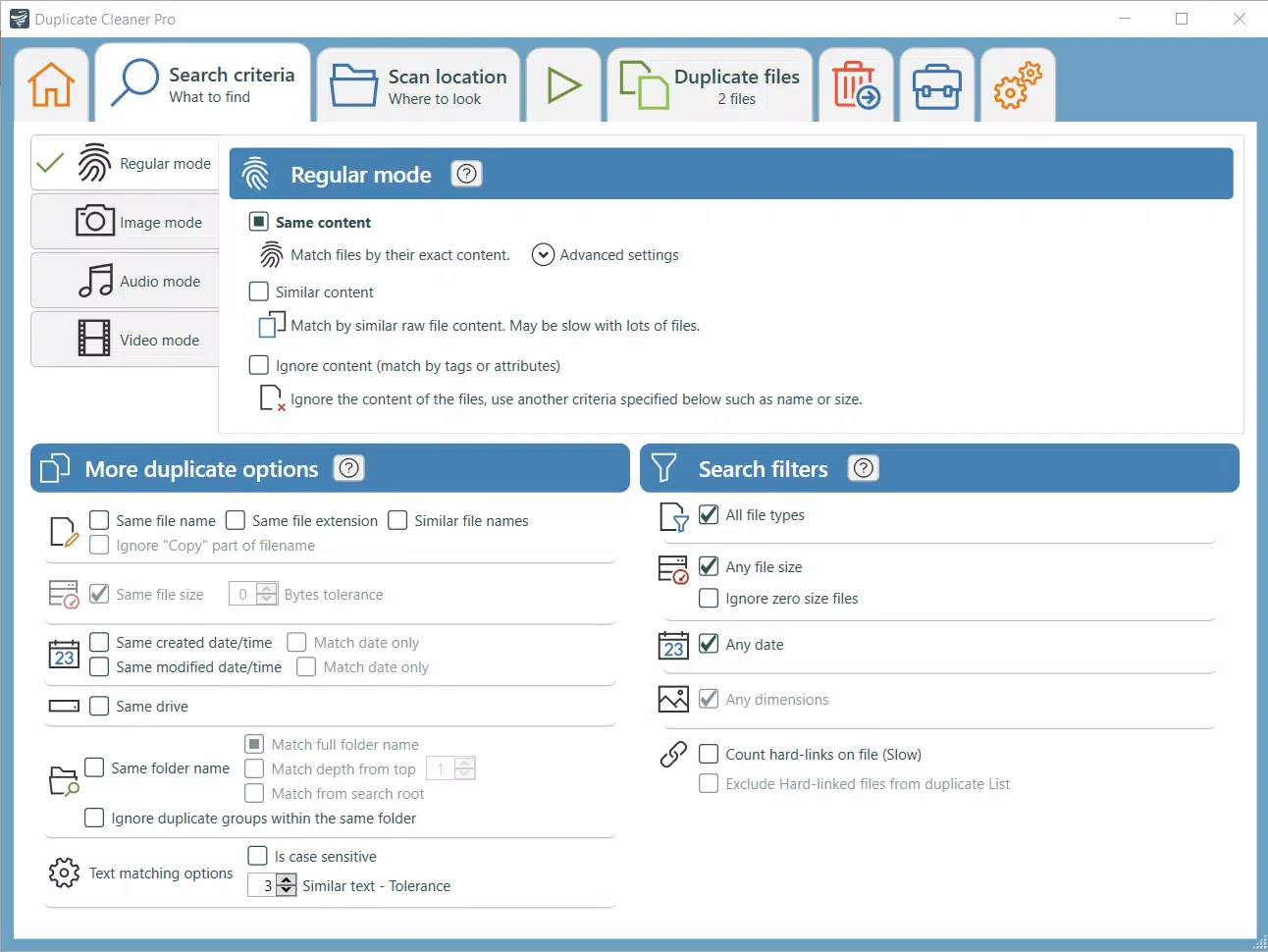
- Customizable Search Criteria – Users can adjust scanning parameters such as file types to include, size thresholds, and comparison methods. This allows for tailored cleanup operations based on individual needs.
For example, a user might configure the app to scan only for duplicate photos larger than 1MB, ensuring that only high-resolution duplicates are targeted. Another user could focus solely on Word documents to clean up outdated project files. These customizable options enhance the app’s adaptability across different workflows.
Interface, UX & Performance
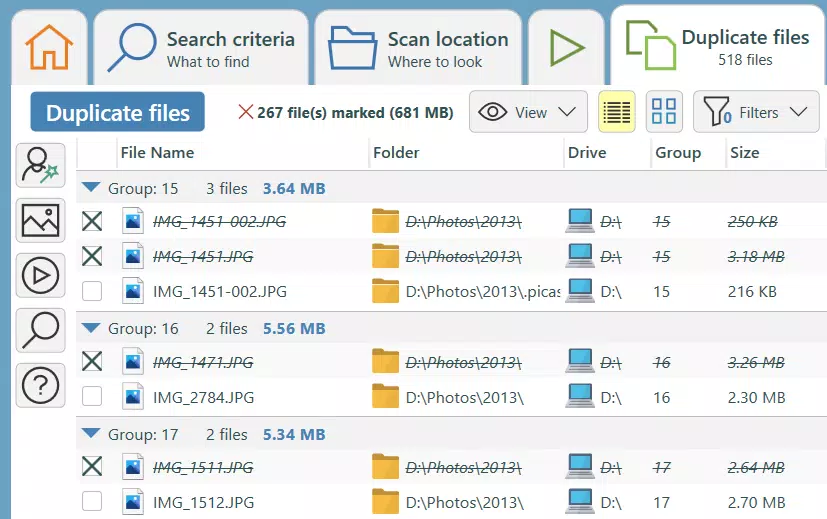
The user interface of Duplicate Cleaner is designed to prioritize clarity and ease of navigation. The main window presents a clean layout with clearly labeled sections for scan initiation, result display, and file selection. Users can start a scan with a single click, and the results are displayed in a categorized list, grouping duplicates by file type and location.
Navigation is straightforward, with minimal onboarding required. The app does not overwhelm users with advanced settings during initial use, allowing for quick access to core functions. The visual design is functional rather than flashy, emphasizing usability over aesthetics.
Although the developer did not list formal performance metrics, the app’s file size of 10.5 MB suggests a lightweight footprint. It is expected to operate efficiently on systems with moderate processing power and memory. Responsiveness during scans appears to be consistent, with no reported lag or crashes in standard usage scenarios. Stability is maintained across typical user sessions, and the app does not consume excessive system resources during background operations.
Platform Compatibility & Technical Requirements
Duplicate Cleaner is available for Windows, making it accessible to a broad user base relying on desktop operating systems. The app runs on the Windows platform, though specific OS versions were not listed. The software has a file size of 10.5 MB, indicating it is compact and suitable for devices with limited storage.
The developer did not specify minimum OS requirements, nor were details provided about compatibility with older Windows versions. Similarly, no information was shared regarding hardware specifications or RAM needs. Users should verify compatibility with their system before installation. The app is offered as a free download, removing cost barriers to entry.
Pros and Cons
Pros
- Free to download and use with no hidden costs
- Lightweight at only 10.5 MB in size
- Supports multiple file types including photos, music, documents, and videos
- Intuitive interface suitable for non-technical users
- Can scan both local drives and network paths
- Customizable scanning options for targeted cleanup
Cons
- Specific OS compatibility details were not disclosed
- Developer did not provide performance benchmarks or system requirements
- No cloud integration or backup features included
- Only available for Windows, limiting cross-platform access
- No in-app update notifications or automatic version checks
FAQ
Is Duplicate Cleaner safe to use?
The app is designed to identify and remove duplicate files without affecting original data. However, users are advised to review files before deletion to prevent accidental removal of important content.
Can I use Duplicate Cleaner on my network drive?
Yes, the software supports scanning and cleaning duplicate files from network paths, making it suitable for shared storage environments.
Does Duplicate Cleaner work on older versions of Windows?
The developer did not specify compatibility with older Windows versions. Users should verify system requirements before installation.
Is there a mobile version of Duplicate Cleaner?
Currently, the app is only available for Windows. No mobile or iOS versions have been released.
How often should I run Duplicate Cleaner?
Users may choose to run the tool periodically, such as every few months, or after transferring large volumes of files to maintain optimal storage efficiency.
Final Thoughts
Duplicate Cleaner stands out as a practical, no-cost solution for users seeking to organize their digital files and reclaim storage space. Its ability to detect duplicates across a wide range of formats—photos, music, documents, and videos—makes it a versatile tool for both personal and small office use. The intuitive interface ensures that even non-technical users can navigate the app with confidence.
While the lack of detailed system requirements and platform limitations restrict broader accessibility, the app’s lightweight design and free pricing model enhance its appeal. For users managing large file collections on Windows systems, Duplicate Cleaner offers a reliable method to maintain system performance and digital hygiene.
Download Duplicate Cleaner now


